“Posts per page” dropdown for BuddyPress single forum topic view

This morning I whipped up a little BuddyPress ditty for the CUNY Academic Commons that allows your members to select how many posts they’d like to see at a time when viewing a single forum topic. It’s not particularly beautiful (for one thing, it requires Javascript to work correctly, though it degrades gracefully by not showing up when no jQuery is available). For that reason, it’s probably not really appropriate for distribution in BuddyPress itself, at least not without some heavy cleanup. Anyway, here it is:

In your theme’s functions.php, place the following function:


/**
 * Echoes the markup for the "number of posts per page" dropdown on forum topics
 */
function cac_forums_show_per_page_dropdown() {
	global $topic_template;

	// Get the current number, so we can preselect the dropdown
	$selected = in_array( $topic_template->pag_num, array( 5, 15, 30 ) ) ? $topic_template->pag_num : $topic_template->total_post_count;

	// Inject the javascript
	?>
	<script type="text/javascript">
	jQuery(document).ready( function() {
		jQuery('div#posts-per-page-wrapper').show();
		jQuery('select#posts-per-page').change(function(){
			var url = '<?php bp_the_topic_permalink() ?>?topic_page=1&amp;num=' + jQuery(this).val();
			window.location = url;
		});
	});
	</script>

	<?php // Now create the markup ?>

	<div id="posts-per-page-wrapper">Posts per page:
		<select name="posts-per-page" id="posts-per-page">
			<option value="5" <?php selected( $selected, 5 ) ?>> 5 </option>
			<option value="15" <?php selected( $selected, 15 ) ?>> 15 </option>
			<option value="30"  <?php selected( $selected, 30 ) ?>> 30 </option>
			<option value="<?php echo $topic_template->total_post_count ?>"  <?php selected( $selected, $topic_template->total_post_count ) ?>> All </option>
		</select>
	</div>

	<?php
}

Then you’ll have to call the function somewhere in your template. I chose to put mine in groups/forum/topic.php, right after the Leave A Reply button:


<?php cac_forums_show_per_page_dropdown() ?>

Finally, you’ll probably want to add some styles to your stylesheet. In particular, you’ll want to ensure that the dropdown doesn’t show up for users who have JS turned off. Here are the styles I’m using; adjust them to your taste.


div#posts-per-page-wrapper {
	display: none;
	position: absolute;
	right: 0;
	top: 0;
	font-size: 11px;
	color: #888;
}
Happy Sys Admin Day to André Pitanga

We’d like to wish André Pitanga, the Systems Administrator of the CUNY Academic Commons, a very happy Sys Admin Day! As the Sys Admin Day site makes clear, sys admins do a host of jobs to keep a site like this running. But what that page does not necessarily make clear is that Sys Admins are our first, second, and third lines of defense when our servers are hit with malicious attacks. Holding the line in the face of such attacks can be hard and unforgiving work; to maintain a strong commitment to openness in the face of such attacks takes a very special person. We are extremely lucky to have André in that position with the support of the CUNY Graduate Center Information Technology Office behind him.

So, thank you, André. Happy Sys Admin Day and congrats again on your well-deserved employee recognition award!!

Commons 1.2.4

After a few weeks of relative inactivity (with good reason), I’ve just tagged version 1.2.4 of the CUNY Academic Commons. Version 1.2.4 is a bugfix release, with a number of fixes. Highlights:

  • The appearance of our 404 page has been improved
  • A WordPress bug regarding adding users to blogs who have apostrophes in their email addresses was located and solved
  • Some security hardening of BuddyPress Docs

See the 1.2.4 milestone for more information on this release.

BuddyPress support for YOURLS: WordPress to Twitter

I’ve just added support for BuddyPress to the YOURLS: WordPress to Twitter plugin, which enables WP and BP integration with the YOURLS URL shortening software. This development was done for a secret (though maybe not so secret anymore 😉 ) project for the Commons, to be implemented here soon.

Read more about the release.

BuddyPress Docs 1.1: Doc History

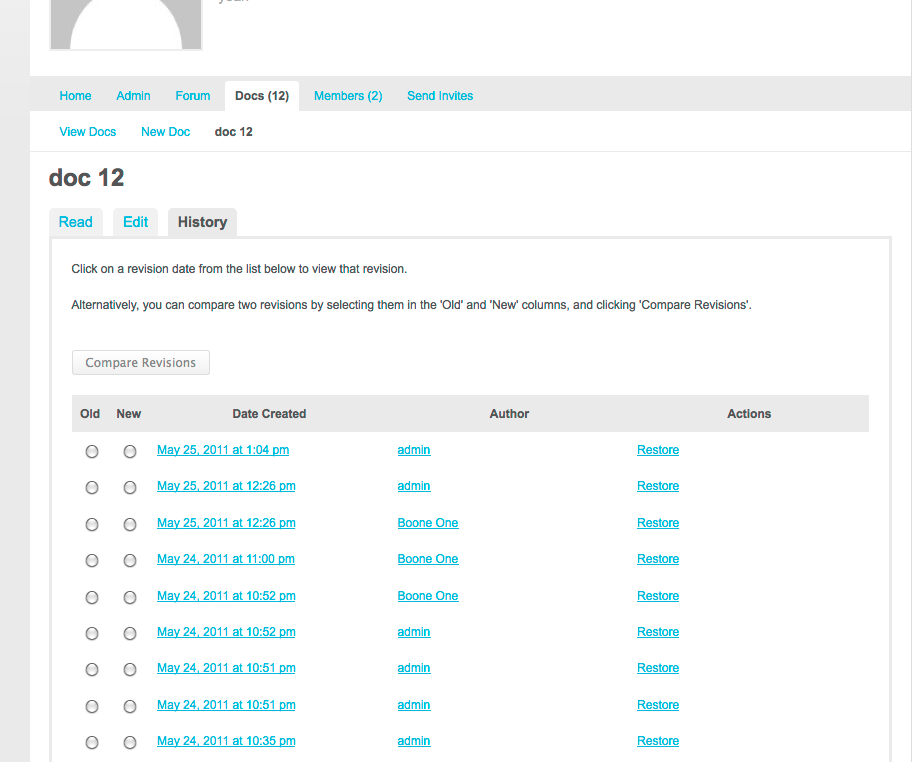
BuddyPress Docs History

I’ve just released version 1.1 of BuddyPress Docs, my collaborative editing software for BuddyPress.

The big new feature in version 1.1 is the History tab. After upgrading, you’ll notice that what used to be a single Edit button has been reorganized into three tabs: Read, Edit, and History. History allows you to brows the entire revision history of a document, to compare the differences between two revisions side by side, to view a single revision, or to restore to any point in the document’s history. Access to the History tab can be limited in the same way that access to the Edit tab can be, on a doc-by-doc basis.

This new feature will, I hope, bring some of the best qualities of wikis to BuddyPress Docs, and make Docs an even better way to collaborate.

The feature will be live on the CUNY Academic Commons in the upcoming weeks.

Download BuddyPress Docs from the wordpress.org plugin repo or follow development at Github.

New WordPress plugin: Unconfirmed

If you’ve ever been responsible for supporting an installation of WordPress Multisite with open registration, you know that the activation process can be a significant source of headaches. Sometimes activation emails get caught by spam filters. Sometimes they are overlooked and deleted by unwitting users. And, to complicate matters, WP’s safeguards prevent folks from re-registering with the same username or email address. This can result in a lot of support requests that are not particularly easy to handle. Aside from reaching manually into the database for an activation key, there’s not much the admin can do to help the would-be member of the site.

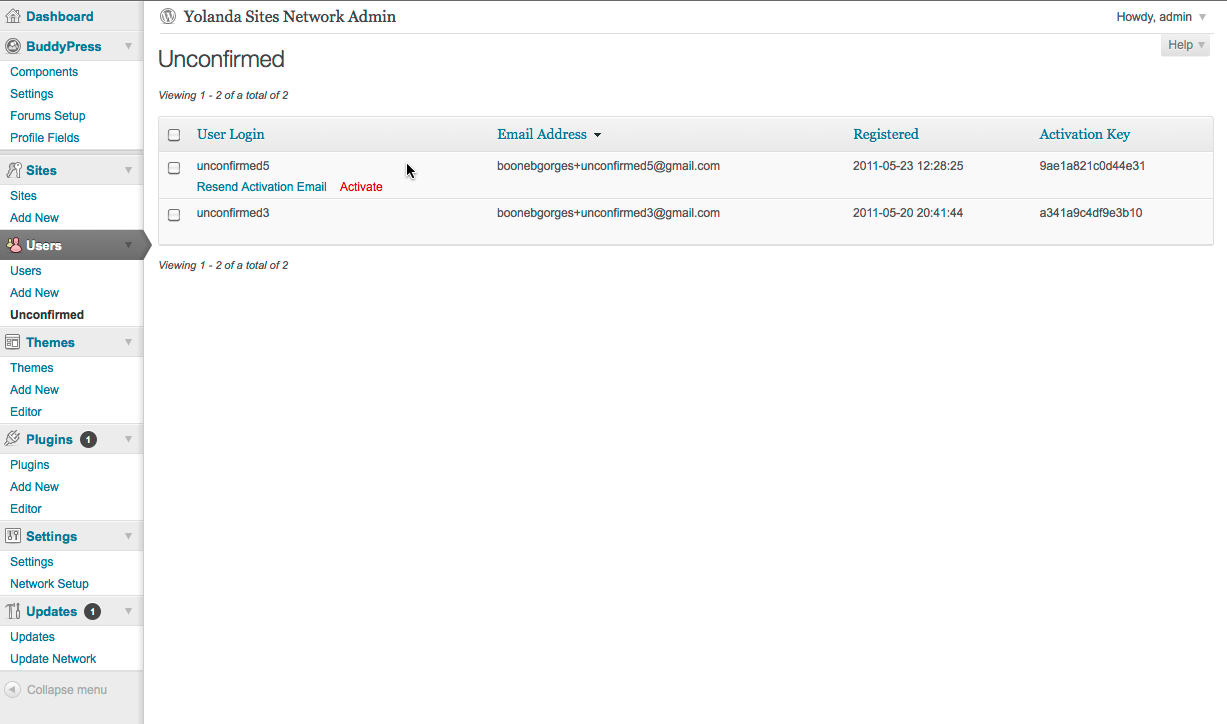
The Unconfirmed Dashboard panel

My new WordPress plugin Unconfirmed eases this problem a bit, by providing WPMS admins with a new set of tools for managing unactivated registrations. (By naming it “Unconfirmed”, I fully expect that the plugin will join some great movies and books in the pantheon of Important Cultural Objects.) Unconfirmed adds a new panel to your Network Admin Dashboard (under the Users menu). When you visit the Unconfirmed panel, it gives you a list of all pending registrations on your system. The list is easily sortable by registration date, username, email address, and activation key. For each unactivated registration, there are two actions that the admin can perform. “Resend Activation Email” does exactly what it says: it sends an exact duplicate of the original activation email, as created by the WordPress core activation notification functions. “Activate” allows admins to activate a pending registration manually, which will trigger the activation success email to the user.

At the moment, Unconfirmed is compatible with WordPress Multisite (aka Network mode) only. In the future, I may expand the plugin to work with non-MS installations of WP. Unconfirmed works with BuddyPress, too. The plugin was developed for use on the CUNY Academic Commons.

Download Unconfirmed from the wordpress.org repo or follow its development on Github.

Commons 1.2.1

I’ve just released Version 1.2.1 of the CUNY Academic Commons. This is a bugfix release for the Commons, comprising a number of fixes and small improvements. Of note:

  • LaTeX support for MediaWiki (just embed your TeX in <math>TeX</math>
  • Improved support for group invitation autocomplete in newer versions of IE
  • Fixed bugs in WP Flickr Photo Album plugin
  • New WP theme: Erudite
  • New WP plugin: Twitter Blackbird Pie

For full details on the release, see the 1.2.1 milestone.
