New WordPress plugin: Unconfirmed

If you’ve ever been responsible for supporting an installation of WordPress Multisite with open registration, you know that the activation process can be a significant source of headaches. Sometimes activation emails get caught by spam filters. Sometimes they are overlooked and deleted by unwitting users. And, to complicate matters, WP’s safeguards prevent folks from re-registering with the same username or email address. This can result in a lot of support requests that are not particularly easy to handle. Aside from reaching manually into the database for an activation key, there’s not much the admin can do to help the would-be member of the site.

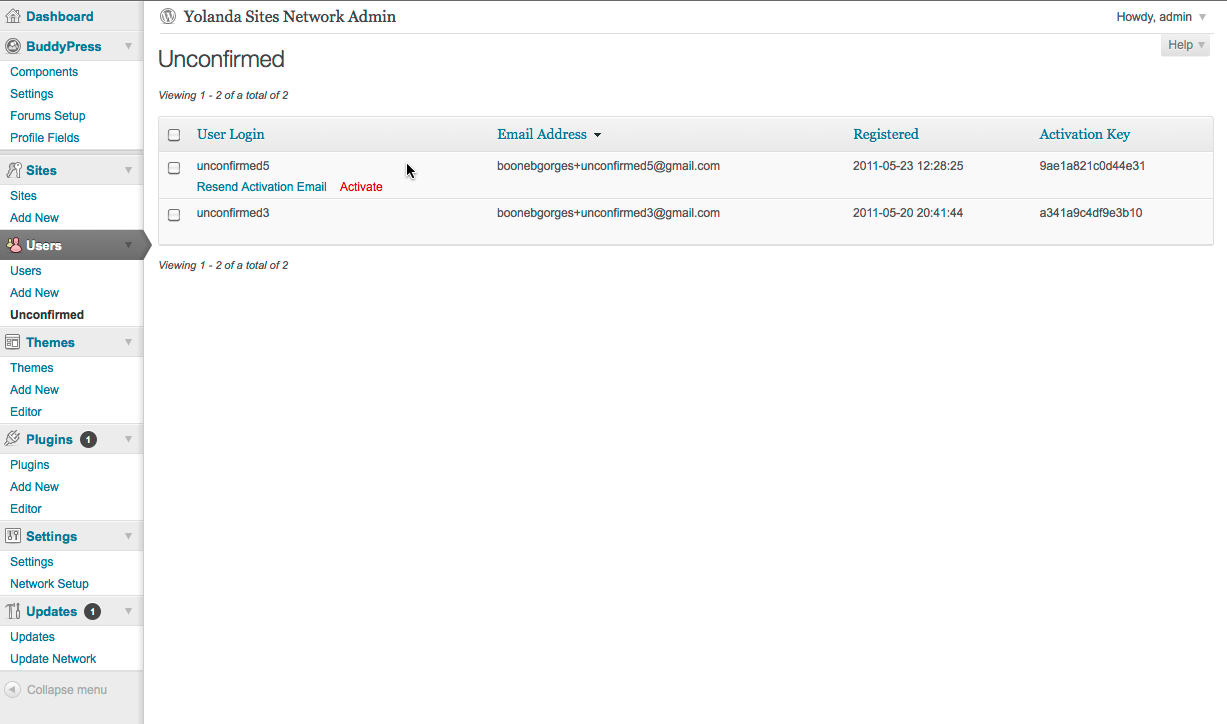
The Unconfirmed Dashboard panel

My new WordPress plugin Unconfirmed eases this problem a bit, by providing WPMS admins with a new set of tools for managing unactivated registrations. (By naming it “Unconfirmed”, I fully expect that the plugin will join some great movies and books in the pantheon of Important Cultural Objects.) Unconfirmed adds a new panel to your Network Admin Dashboard (under the Users menu). When you visit the Unconfirmed panel, it gives you a list of all pending registrations on your system. The list is easily sortable by registration date, username, email address, and activation key. For each unactivated registration, there are two actions that the admin can perform. “Resend Activation Email” does exactly what it says: it sends an exact duplicate of the original activation email, as created by the WordPress core activation notification functions. “Activate” allows admins to activate a pending registration manually, which will trigger the activation success email to the user.

At the moment, Unconfirmed is compatible with WordPress Multisite (aka Network mode) only. In the future, I may expand the plugin to work with non-MS installations of WP. Unconfirmed works with BuddyPress, too. The plugin was developed for use on the CUNY Academic Commons.

Download Unconfirmed from the wordpress.org repo or follow its development on Github.

New BuddyPress plugin: BuddyPress Docs

When I explain the CUNY Academic Commons to someone for the first time, the words ‘connect’ and ‘collaborate’ usually loom large. We provide a number of tools to make it easier for people to find each other (that’s the connecting), and then we try to make it easy for those people to work together on projects that matter to them (that’s the collaborating). Today I am releasing the first public beta of a new BuddyPress plugin that will, I hope, be an important tool in the Commons (and BuddyPress) collaboration toolbox: BuddyPress Docs.

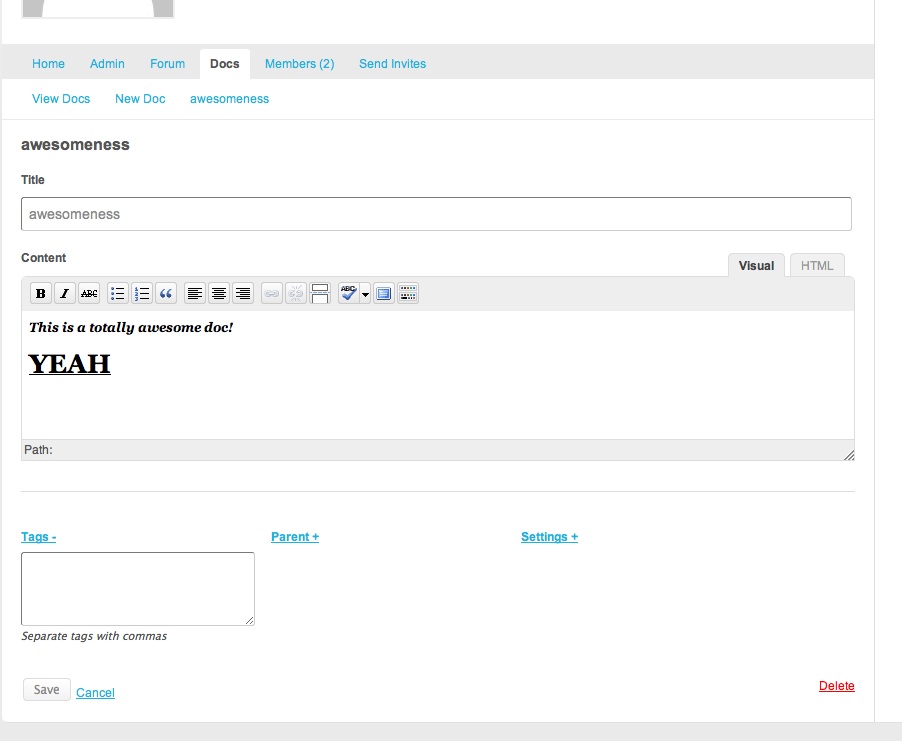
BuddyPress Docs adds a new tab to groups where members can collectively create and edit documents, using an easy-to-use rich text editor. Docs support tagging, hierarchy, oEmbed multimedia, and much more. I’ve written about the feature list in detail on the BuddyPress Docs homepage.

Today the project is being released in a near-stable public beta. That means a few things. First, for the moment you run the plugin on a production site at your own risk, as there are bound to be bugs and rough spots (which I hope you will report back to me!). Second, it means that it’s not up and running on the Commons quite yet. BuddyPress Docs is slated to be turned on here with the release of Commons 1.2, which should be sometime in the next few weeks. The intervening weeks should give folks in the general BuddyPress community some time to put Docs through its paces before it gets put to work here.

The official documentation states that BuddyPress Docs requires WordPress 3.1 and BuddyPress 1.3. The latter requirement is a bit of an overstatement; Docs has been tested with BuddyPress 1.2.8 and it works well. However, the former requirement is strict: though the plugin might appear to work with versions of WP prior to 3.1, certain key features will not work (in particular, taxonomies will not work correctly, so that all Docs will appear on every group, no matter which group created them). Perhaps for the 1.0 stable release I’ll forcibly prevent the plugin from being loaded on those earlier versions of WP.

You can follow the plugin’s development at http://github.com/boonebgorges/buddypress-docs.

Hardening BuddyPress Group Documents

The BuddyPress Group Documents plugin allows groups a handy way for users to share documents with fellow members of a BP group. It’s crucial to the work that is done on the CUNY Academic Commons. But, by default, the plugin stores documents in a subdirectory of your WP uploads folder (usually /wp-content/blogs.dir/ on multisite). That means that documents are available directly, to anyone who has the URL, regardless of the public/private/hidden status of groups. This isn’t a problem from within BuddyPress, since URLs for the documents only appear inside of the protected group interface. But if the URL is shared, then the document becomes publicly available. Worse, if someone posts the URL of a document in a public place, search engine bots will find it, and the contents of the document could end up in Google.

I wrote a few helper functions to change this behavior. The strategy is this: Move the files so that they are not accessible via URL, ie in a directory above the web root. (In my case, it’s a directory called bp-group-documents, just above my web root.) Then, catch requests of a certain type (I’ve chosen to go with a URL parameter get_group_doc=), and check them to see whether the current user has the adequate permission to access the document in question. Finally, make sure that all of the URLs and paths that BPGD uses to upload and display documents are filtered to the updated versions. I’ve provided my code below – use and modify at your pleasure. You should be able to place it in your plugins/bp-custom.php file, and then move your existing docs from their current location (probably something like wp-content/blogs.dir/1/files/group-documents) to the new directory.

I also added a line to my .htaccess file to ensure that requests to the old URLs are redirected to the new, hardened URL. That line is this:


RewriteRule ^wp\-content/blogs\.dir/1/files/group\-documents/(.*) /?get_group_doc=$1 [R,L]
 

Obviously, you may have to modify it for different file paths.

EDITED Feb 8, 2011 to include the code for creating directories when none exist


define( 'BP_GROUP_DOCUMENTS_SECURE_PATH', substr( ABSPATH, 0, strrpos( rtrim( ABSPATH, '/' ), '/' ) ) . '/bp-group-documents/' );

function cac_filter_doc_url( $doc_url, $group_id, $file ) {
	$url = bp_get_root_domain() . '?get_group_doc=' . $group_id . '/' . $file;
	return $url;
}
add_filter( 'bp_group_documents_file_url', 'cac_filter_doc_url', 10, 3 );

function cac_filter_doc_path( $doc_url, $group_id, $file ) {
	$document_dir = BP_GROUP_DOCUMENTS_SECURE_PATH . $group_id . '/';
	
	if ( !is_dir( $document_dir ) )
		mkdir( $document_dir, 0775, true );

	$path = BP_GROUP_DOCUMENTS_SECURE_PATH . $group_id . '/' . $file;
	return $path;
}
add_filter( 'bp_group_documents_file_path', 'cac_filter_doc_path', 10, 3 );

function cac_catch_group_doc_request() {
	$error = false;

	if ( empty( $_GET['get_group_doc'] ) )
		return;
	
	$doc_id = $_GET['get_group_doc'];
	
	// Check to see whether the current user has access to the doc in question
	$file_deets 	= explode( '/', $doc_id );
	$group_id 	= $file_deets[0];	
	$group		= new BP_Groups_Group( $group_id );
	
	if ( empty( $group->id ) ) {
		$error = array(
			'message' 	=> 'That group does not exist.',
			'redirect'	=> bp_get_root_domain()
		);
	} else {
		if ( $group->status != 'public' ) {
			// If the group is not public, then the user must be logged in and
			// a member of the group to download the document
			if ( !is_user_logged_in() || !groups_is_user_member( bp_loggedin_user_id(), $group_id ) ) {
				$error = array(
					'message' 	=> sprintf( 'You must be a logged-in member of the group %s to access this document. If you are a member of the group, please log into the site and try again.', $group->name ),
					'redirect'	=> bp_get_group_permalink( $group )
				);
			}
		}
		
		// If we have gotten this far without an error, then the download can go through
		if ( !$error ) {
			
			$doc_path = BP_GROUP_DOCUMENTS_SECURE_PATH . $doc_id;
			
			if ( file_exists( $doc_path ) ) {
				$mime_type = mime_content_type( $doc_path );
				$doc_size = filesize( $doc_path );
				
				header("Cache-Control: public, must-revalidate, post-check=0, pre-check=0");
				header("Pragma: hack");
					
				header("Content-Type: $mime_type; name='" . $file_deets[1] . "'");
				header("Content-Length: " . $doc_size );
				
				header('Content-Disposition: attachment; filename="' . $file_deets[1] . '"');
				header("Content-Transfer-Encoding: binary");              
				ob_clean();
				flush();  		
				readfile( $doc_path );
				die();
		       
			} else {
				// File does not exist
				$error = array(
					'message' 	=> 'The file could not be found.',
					'redirect'	=> bp_get_group_permalink( $group ) . '/documents'
				);
			}
		}
	}
		
	// If we have gotten this far, there was an error. Add a message and redirect
	bp_core_add_message( $error['message'], 'error' );
	bp_core_redirect( $error['redirect'] );
}
add_filter( 'wp', 'cac_catch_group_doc_request', 1 );

// http://www.php.net/manual/en/function.mime-content-type.php#87856
if(!function_exists('mime_content_type')) {

    function mime_content_type($filename) {

        $mime_types = array(

            'txt' => 'text/plain',
            'htm' => 'text/html',
            'html' => 'text/html',
            'php' => 'text/html',
            'css' => 'text/css',
            'js' => 'application/javascript',
            'json' => 'application/json',
            'xml' => 'application/xml',
            'swf' => 'application/x-shockwave-flash',
            'flv' => 'video/x-flv',

            // images
            'png' => 'image/png',
            'jpe' => 'image/jpeg',
            'jpeg' => 'image/jpeg',
            'jpg' => 'image/jpeg',
            'gif' => 'image/gif',
            'bmp' => 'image/bmp',
            'ico' => 'image/vnd.microsoft.icon',
            'tiff' => 'image/tiff',
            'tif' => 'image/tiff',
            'svg' => 'image/svg+xml',
            'svgz' => 'image/svg+xml',

            // archives
            'zip' => 'application/zip',
            'rar' => 'application/x-rar-compressed',
            'exe' => 'application/x-msdownload',
            'msi' => 'application/x-msdownload',
            'cab' => 'application/vnd.ms-cab-compressed',

            // audio/video
            'mp3' => 'audio/mpeg',
            'qt' => 'video/quicktime',
            'mov' => 'video/quicktime',

            // adobe
            'pdf' => 'application/pdf',
            'psd' => 'image/vnd.adobe.photoshop',
            'ai' => 'application/postscript',
            'eps' => 'application/postscript',
            'ps' => 'application/postscript',

            // ms office
            'doc' => 'application/msword',
            'rtf' => 'application/rtf',
            'xls' => 'application/vnd.ms-excel',
            'ppt' => 'application/vnd.ms-powerpoint',

            // open office
            'odt' => 'application/vnd.oasis.opendocument.text',
            'ods' => 'application/vnd.oasis.opendocument.spreadsheet',
        );

        $ext = strtolower(array_pop(explode('.',$filename)));
        if (array_key_exists($ext, $mime_types)) {
            return $mime_types[$ext];
        }
        elseif (function_exists('finfo_open')) {
            $finfo = finfo_open(FILEINFO_MIME);
            $mimetype = finfo_file($finfo, $filename);
            finfo_close($finfo);
            return $mimetype;
        }
        else {
            return 'application/octet-stream';
        }
    }
}
 

New WordPress plugin: Prezi WP

A member of the Commons community recently requested the ability to embed Prezi presentations into her Commons blog. I had a look at the options available in the wordpress.org repository, and the pickings were slim indeed. So I wrote my own plugin, Prezi WP. It’s pretty simple: use the [prezi] shortcode in your posts to embed a presentation. See the plugin homepage for more details on how to use the plugin, and how to download it and use it on your own WP installation.

Group Announcements tab in BuddyPress

I had a request or two to explain how I built the Group Announcements feature on the CUNY Academic Commons. Here goes.

Brief background: When the Commons was upgraded to BuddyPress 1.2, we got the benefit of interactive activity streams everywhere, including groups. This caused some confusion, however, as users were uncertain where conversation best fit into the Commons’s architecture: in the Forums (where it had been traditionally), or in the activity stream. In some communities this kind of fracturing might be okay or even welcome, but in ours it was confusing. At the same time, we wanted a way for group admins and mods to send important notices to the members of their groups. By taking the group activity updates and repurposing it as a Group Announcements section, I was able to kill two birds with one stone: providing an announcement space for mods, while focusing extended discussion in the forums.

You can download the CAC Group Announcements plugin here.

I’m not putting this in the repo at the moment because I don’t want to build a proper admin UI and support it 🙂 For that reason, here is a primer on how the plugin works – if you want to customize or maintain it, you’re on your own, buster.

  1. The CAC_Group_Announcements class is an instance of the BuddyPress Group Extension API. It is responsible for creating the Announcements tab markup and adding it to the nav. You’ll notice that the majority of the markup is created by including bp-default’s activity-loop.php and post-form.php templates. You could customize this more if you wanted.
  2. bp_is_group_announcements() is a little template tag that can be used to test whether you’re looking at a group announcements page. This is needed for the activity filter, in step 3.
  3. cac_set_announcement_filter() adds a filter to the bp_has_activities query string when you are looking at an announcements page, so that it only displays activity items of the type activity_update. In other words, when you are looking at the regular activity stream for the group, you see all of the associated group activity items (new members, forum posts, etc) but when you’re on the announcements page you only see activity updates (which, remember, have been repurposed as announcements).

As I look at the code, I see that there are things I would definitely change if I were going to make this into a distributed plugin. If you want to make those changes, be my guest. You’re welcome to help each other in the comment section, but I won’t be formally supporting this, as it is a very basic hack that should happen at the theme level anyway. Good luck!

The technical side of Commons v1.0

As Matt @admin announced earlier today, we’ve just tagged the CUNY Academic Commons “version 1.0”.

The 1.0 milestone represents a couple of big changes in our development processes.

  1. Versioning

    The most obvious change is the use of version numbers. It might seem at first like a relatively minor and superficial alteration in the way we operate. In truth, it’s a big change.

    Prior to the switch, our development cycles were haphazard at best. Bugs would be fixed and features implemented whenever someone on the development team happened to get around to it. That system (or lack thereof) works pretty well for a small team. But the team behind the Commons has been growing steadily over the past year, both in sheer number and in breadth (of geographical distribution, of areas of technical expertise, of responsibility). Greater distribution requires more thoughtful coordination and communication, and releasing discrete versions is a tool that we hope will help us achieve these goals.

    There are many benefits to discrete versioning. Here are a few prominent ones, off the top of my head:

    • Improved ticket management · Our ticketing system works best when tasks can be clearly assigned to individual developers, and organized according to priority. Version numbers provide a framework for this kind of management, as important tickets get assigned to earlier versions, and developer workload balance for a given release can be easily assessed.
    • Improved roadmapping · Roadmaps – software development language for “schedule of upcoming features” – are easier to understand and to implement when they’re organized by release numbers instead of thrown into a single pile.
    • Improved testing · When features and bugfixes are rolled out one-at-a-time, it can mean near-nonstop testing for the development and community team. Having controlled releases means that testing for a whole set of changes can be managed at the same time, in the days leading up to the release itself. That’s a better use of everyone’s time.
  2. Better distinction between development, staging, and production

    In those halcyon days early in the life of the Commons, nearly all development was done in the live production environment. When fixing a bug or launching a feature, I’d edit the site while it was up and running. Danger, Will Robinson! So many things can go wrong when you’re editing a live site, it’s hardly worth enumerating.

    The dev team eventually did set up a development environment. But it was running on a different server from the production site, and so you could never be guaranteed that a fix on the dev site would translate to the live site. Moreover, all those little fixes that would get sneaked directly onto the production site meant the dev site and the production site got progressively more out of synch as time went on, until the dev site was sufficiently different from the live site to be next to useless as a development site.

    Our new setup is much more sophisticated and, we hope, more conducive to quality development. We have a staging environment running in exactly the same operating environment as the production environment. Development environments are all local, which is to say that each member of the development team has a functional copy of the site on his personal computer. To whatever extent possible, development takes place in those local environments, is tested in our staging environment to look for environment-specific bugs, and only then pushed to the production environmnet. The (lofty) goal is that we’ll never have to make tweaks directly to the production site.

  3. Version control

    By “version control” I mean something a bit different from (though related to) “versioning” as mentioned above. Version control is a way to keep track of every change made to the files. It used to be that, when I tweaked a template or plugin file, unless I made a backup, the previous version would be overwritten and lost. Now that we’re using Git, we can always revert changes if need be (or browse the source out of mere historical curiosity!).

    The need for version control is all the more pressing as our development team grows. It’s important to keep track of who is changing what. And when you have local, independent development environments, it’s imperative that you have a way of making sure that the changes that I make on my version are not overwritten by the changes made by another member of the team when we merge them together in the staging environment. Git is designed for this kind of distributed development, as it keeps careful track of who edited what (‘git blame’, appropriately enough) and allows graceful merging of disparate edits.

    Using Git with WordPress and MediaWiki posed something of a technical challenge. For one thing, we wanted to track the entire codebase, but not files that users had uploaded to the system. Furthermore, MW and WP store crucial configuration information in the database, which is not tracked by Git. Finally, in order for local development environments to work properly, some environment-specific variables (database passwords, for instance) needed to be abstracted out of tracked files like wp-config.php. Zach at Cast Iron Coding forged a path through this jungle, and we’ve come up with a system that allows us all to keep our versions in sync using Git. In the future, I hope to write in a little more techinical detail just how this works.

    We use Git not just in our local development environments, but on the staging and production servers as well. For instance, when a release candidate has been vetted in the staging environment and is ready to go live, it’s extremely easy to launch the version on the production site: I simply shell into the production server and git pull or checkout the tagged version from the repository.

New BuddyPress plugin: BP External Activity

Here on the CUNY Academic Commons, we have an installation of MediaWiki which runs alongside our WordPress/BuddyPress installation. Without some additional coding, edits on the wiki don’t show up in the Commons News feed, and as a result they tend to get a little lost in the shuffle. This new plugin, BP External Activity, addresses this issue by allowing the administrator of a BuddyPress installation to specify an arbitrary RSS feed whose items will be regularly imported into the activity stream.

The plugin imports RSS feeds every hour. You may find that you need to decrease your Simplepie cache time to make it work:
add_filter( 'wp_feed_cache_transient_lifetime', create_function('$a', 'return 600;') );
reduces the RSS cache to ten minutes, for example. Put that in your bp-custom.php file if you are having problems with the plugin.

At the moment, the plugin uses the Author field from the RSS feed to look for a matching author in your WP database. If it doesn’t find one, it uses the unlinked text ‘A user’, as in ‘A user edited the wiki page…’.

Thanks to Andy Peatling, whose External Group Blogs served as the inspiration for a good part of the code.

Visit the plugin homepage for more details.

BuddyPress plugins running on the CUNY Academic Commons

A few people have asked recently for a list of the plugins installed on the CUNY Academic Commons. In the spirit of Joe’s post, here I thought I’d make it public. I’m going to limit myself to the BuddyPress plugins here, for the sake of simplicity. (I’d like to write a series of posts on the anatomy of the CUNY Academic Commons; maybe this will be the first in that series.) Here they are, in no particular order other than the order in which they appear on my plugin list.

  • BP TinyMCE. This plugin is messed up, and I have part of it switched off, but I still use the filters that allow additional tags through, in case people want to write some raw HTML in their forum posts, etc.
  • BP Groupblog. Allows blogs to be associated with groups, displaying posts on that group’s activity feed and automatically credentialing group members on the blog. I did some custom modifications to the way the plugin works so that clicking on the Blog tab in a group leads you to subdomain address rather than the Groupblog custom address (thereby also ensuring that visitors see the intended blog theme rather than the BP-ish theme).
  • BP MPO Activity Filter. This plugin works along with More Privacy Options to ensure that the new privacy settings are understood by Buddypress and that blog-related activity items are displayed to the appropriate people.
  • BuddyPress Group Documents. This one is crucial to our members, who often use the plugin to share collaborative docs.
  • BP Include Non-Member Comments makes sure that blog comments from non-members are included on the sitewide activity feed.
  • BP External Activity – an as-yet unreleased plugin I wrote that brings in items from an external RSS feed and adds them to the sitewide activity feed. We’re using it for MediaWiki edits.
  • BP Group Management lets admins add people to groups. Very handy for putting together a group quickly, without having to wait for invites.
  • BP System Report. We’re using this one to keep track of some data in our system and report it back to members and administrators.
  • BuddyPress Group Email Subscription allows users to subscribe to immediate or digest email notification of group activity. Right now we’re running it on a trial basis with a handful of members, in order to test it. (Here’s how to run it with a whitelist of users, if you want)
  • BuddyPress Terms of Service Agreement, another as-yet-unreleased plugin (this one by CAC Dev Team member Chris Stein) that requires new members to check TOS acceptance box before being allowed to register.
  • Custom Profile Filters for BuddyPress allows users to customize the way that their profile interests become links
  • Enhanced BuddyPress Widgets. Lets the admin decide the default state of BP widgets on the front page.
  • Forum Attachments for BuddyPress. Another of our most important BP plugins, this one allows users to share files via the group forums.
  • Group Forum Subscription for BuddyPress. This is our legacy email notification system, which is going to be in place until I get back from my honeymoon and can replace it 🙂
  • Invite Anyone lets our users invite new members to the community and makes it easier to populate groups.

Questions about any of these plugins or how they work with BuddyPress? Ask in the comments.

New BuddyPress plugin: BP System Report

One of the goals of the Community Team behind the CUNY Academic Commons is to figure out how members are using the site, so that we can make it a better place for meeting and collaborating with each other. With a system like BuddyPress, though, it’s a bit hard to get a general sense of what’s going on on the site. BP System Report is a new plugin meant to address this issue.

BP System Report records regular summaries of statistics related to your BuddyPress installation. You can then compare any two snapshots using the built-in comparison tool, which calculates percentage differences. The information currently gathered by the plugin:

BP System Report
BP System Report
  • Members: total number, number active during report interval, percent active, total friendship connections, average friendships per member
  • Groups: total number, number active, percent active, total group memberships, average group membership
  • Public/private/hidden groups: total number, number active, percent active, total membership, average membership
  • Blogs: total number, number active, percent active

The plugin is quite beta, so still might be buggy. Please feel free to report problems.

Future versions of this plugin will include:

  • more analytical data collected
  • CSV export
  • better admin control over report frequency

Regarding this last point: the BP System Report defaults to twice-daily reports. If you’d like to adjust it manually, deactivate the plugin, edit the line
wp_schedule_event( time() + 30, 'twicedaily', 'bp_system_report_pseudo_cron_hook' );
in bp-system-report.php to say ‘hourly’ or ‘daily’ or ‘weekly’ (or some custom time you define in bp_system_report_more_reccurences() )

Download BP System Report here.

New BuddyPress plugin: BP Group Management

BuddyPress has great group administrator functions – the ability to invite members to groups, to promote them to different statuses, the ability to ban certain member, and so on. But unless the sitewide administrator is also the administrator of the group, the site admin does not have the same abilities. On some sites – like here on the Academic Commons, where it’s frequently desirable to add members manually to groups – this limitation for sitewide admins can be somewhat restricting.

This plugin, BP Group Management, creates a new administration panel to the Dashboard, accessible only by the sitewide administrator, which does the following:

  • provides a sortable list of all groups (public, private, and hidden) with their created-on dates and ID numbers
  • allows admins to delete groups easily
  • allows admins to view lists of current members, and to promote/demote/ban them
  • allows admins to add any member of the site directly to the group, skipping the need for invitations

Download the plugin here.

The version of the plugin in the repository only works for versions of BuddyPress 1.2 and greater. For a mostly functional version of the plugin that works with BP 1.1.3 (no guarantees on any other versions, but it should work down to BP 1.1 at least), click here.
